Main Menu
Choosing a Video Keypad Door Entry system is not just a matter of comparing screen sizes or counting features. The right system should let residents see who is at the door, communicate clearly, and grant access without adding daily frustration. Picture a visitor standing outside in afternoon glare, pressing a damp keypad while someone answers from a dim hallway. That ordinary moment reveals more than a polished product photo can.
Start by considering the entrance itself. Measure the available space, check existing wiring, and note whether the camera faces direct sunlight or a covered porch. Look for clear video, usable night viewing, audible two-way communication, and keypad buttons that are easy to operate. Small details matter. A bright display may be difficult to read in sunlight, while a feature-rich app may be unreliable if the property’s network is weak. Check the manufacturer’s stated operating conditions and installation requirements rather than assuming every model fits every building.
Access features also deserve careful review. Decide whether temporary codes, remote answering, or integration with an existing door lock are genuinely useful for your household. Ask how the system stores recordings, manages user access, and receives software updates. These details can be easy to overlook. Product specifications offer a starting point, but they cannot confirm how a device will perform at your particular entrance. Compare warranty terms, support options, and installation needs before choosing. No system is perfect; the goal is a dependable fit, not the longest feature list.
Start by listing who needs entry and when. Residents, staff, delivery workers, and occasional visitors may need different permissions. Estimate the busiest arrival period, not just the average day. A system that handles five calls an hour may struggle during a shift change. Decide whether users need remote answering, temporary visitor codes, entry records, or hands-free access. Keep the requirements practical; extra features can make daily use harder.
Walk the site before comparing equipment. Check the distance from the entry point to the indoor monitor, available power, network coverage, and cable routes. Note rain exposure, direct sunlight, nighttime lighting, and background noise near the keypad. Also confirm that the door or gate can release reliably with the proposed hardware. A strong camera cannot fix a weak network. I would verify signal strength at the actual mounting location, since a nearby router does not guarantee a stable connection. Small details matter.
Tips: Stand outside and test the view at eye level. Try the keypad with wet hands and in low light. Ask a few regular users to describe their routine; their feedback may reveal needs the planning checklist missed.
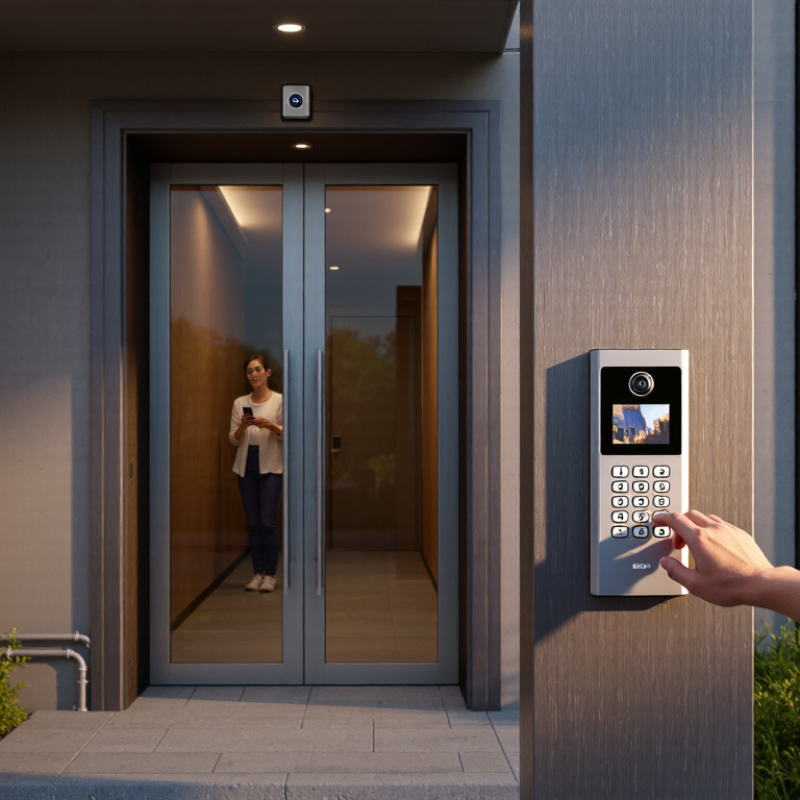
A video keypad door entry system works as a chain of connected parts. The outdoor station combines a camera, microphone, speaker, and keypad. Check that the camera captures faces at the actual approach distance, not just the doorway. A backlit keypad helps visitors enter a code after dark. Clear two-way audio matters when traffic or wind makes conversation difficult.
Inside, a monitor or mobile interface lets a resident see and speak with a visitor. The controller processes the request and signals the electric lock. Confirm that the lock, controller, and power supply are compatible; otherwise, a polished front panel may hide a weak installation. Network connection also affects video calls and remote alerts. Ask how the system behaves during a power or internet outage. A setup can look tidy on paper but feel clumsy in daily use. That detail is easy to miss.
Tips: Test the camera at night and listen from the indoor unit. Check keypad visibility, wiring routes, and backup power options. Write down who can add or remove entry codes. Keep the list secure.
A video keypad door entry system should make it easy to identify visitors and grant access without guesswork. Check the camera’s view from the height where visitors will stand. Faces should remain clear when someone wears a hat or stands slightly to one side. Small details matter. Test the image at dusk, not only in bright daylight. Listen for audio delay, too; even a short lag can make a conversation awkward.
The keypad should be readable, responsive, and usable with wet hands or gloves if those conditions are common at your entrance. Consider how PINs are issued, changed, and removed when a user no longer needs access. Access control features should match daily routines: temporary visitor codes, time-based permissions, and a clear entry log can reduce manual checks. Confirm what happens during a network or power outage. A system may look capable on paper, but a complicated setup can frustrate staff.
Tips: Stand where visitors will stand and test the camera in daylight and after dark. Try several keypad entries, then review the access log. Check whether alerts reach the right person. One overlooked issue: strong backlighting can still hide a face. Don’t assume a good screen fixes poor camera placement.
Before choosing a video keypad entry system, check what your door already supports. Identify the lock type, operating voltage, wiring, and available power supply. Confirm that the keypad’s relay matches the lock, and that the camera connects reliably to your network. A clear video feed is useless if the signal drops near the entrance. Check cable routes, weather exposure, and mounting space, too. Test before drilling.
Security depends on more than a PIN. Look for encrypted communication, individual user codes, access logs, and a clear process for removing former users. The Verizon 2024 Data Breach Investigations Report found that 68% of breaches involved a non-malicious human element. That report concerns data breaches, not door keypads, so it cannot measure keypad risk directly. Still, it is a useful reminder to secure administrator accounts and avoid shared credentials. Small details matter.
Installation requirements can change the best choice. Check whether the system needs a dedicated power supply, network cabling, or integration with an existing intercom. Confirm that the door can still be opened safely during a power or network failure, and have a qualified installer check applicable life-safety requirements. I would also test the camera at night and in rain; product specifications do not always reflect your actual entrance. A small oversight can mean expensive rework.
| Decision Area | What to Check | Practical Guidance | Why It Matters |
|---|---|---|---|
| Door and lock compatibility | Lock type, voltage, current draw, and whether the system provides a compatible relay output | Confirm the lock’s electrical requirements and whether it is fail-safe or fail-secure. Use an appropriately rated power supply and relay; do not assume the keypad can power the lock directly. | An electrical mismatch can prevent reliable unlocking or damage equipment. Fail-safe locks unlock when power is lost; fail-secure locks remain locked from the secure side, subject to applicable life-safety requirements. |
| Existing wiring | Available cable routes, conductor count, cable condition, and distance from the entry panel to indoor equipment | Check the installation manual for supported cable types and maximum distances. Network video systems may require Ethernet, while other systems use dedicated wiring; existing doorbell wiring may not be suitable. | Wiring requirements vary by system. Verifying the route and cable before purchase helps avoid unexpected construction or additional equipment. |
| Network and connectivity | Whether the system is standalone, network-connected, or cloud-connected; Ethernet or Wi-Fi availability | For network models, verify coverage at the entrance, network requirements, and whether remote access depends on internet service or a subscription. A wired Ethernet connection can provide a more consistent link where available. | Connectivity affects video access, notifications, remote answering, and software updates. Core entry functions may differ when the network or internet connection is unavailable. |
| Power requirements | Required supply voltage and current, power for the lock, and backup-power options | Check the specifications for the panel, monitor, network equipment, and electric lock separately. If backup operation is important, confirm which components remain powered during an outage. | Video equipment and locks can have different power needs. A backup supply for one component does not necessarily keep the entire entry system working. |
| Keypad credentials | PIN length, number of users or codes, temporary-code support, and code-management method | Choose a model that supports the number of residents and authorized users. Prefer unique codes where possible, and confirm that codes can be changed or revoked without replacing the hardware. | Shared or unchanged codes are harder to manage. Individual or temporary codes can make it easier to remove access when a resident, worker, or visitor no longer needs it. |
| Video and viewing angle | Camera field of view, image quality, low-light performance, and indoor viewing options | Check the camera’s stated viewing angle and test whether it can capture a visitor’s face at the installed height and distance. Review night-vision or low-light details for entrances with limited lighting. | A wide field of view can cover more of an entrance, but camera position and lighting also affect identification. Published resolution alone does not guarantee a clear image in every setting. |
| Security and privacy | Administrative access controls, software updates, data storage, and remote-access protections | Look for a way to change default credentials, restrict administrator access, and receive security updates. Review whether video is stored locally or remotely, how long it is retained, and who can access it. | Video and entry logs can contain sensitive information. Clear access controls and a suitable storage policy help reduce unnecessary exposure. |
| Weather and placement | Outdoor operating conditions, water and dust protection rating, sun exposure, and mounting surface | Check the manufacturer’s environmental ratings and temperature limits against the installation location. Use a suitable mounting position and follow sealing instructions for exposed wiring and fixings. | An indoor-rated device may not withstand rain, dust, or temperature extremes. Exposure and poor mounting can shorten service life or cause unreliable operation. |
| Building and user needs | Number of entrances, residents, indoor stations, accessibility needs, and visitor-handling process | Confirm support for the required number of doors and indoor endpoints. Consider keypad visibility, usable button spacing, audible or visual feedback, and an alternative entry method for authorized users. | A system that fits the building and its users is easier to operate. Multi-unit properties may also need separate credentials and clear administration responsibilities. |
| Installation and compliance | Mounting work, lock wiring, local electrical and fire-safety rules, and permission to modify shared property | Review the installation instructions before purchasing. Consult a qualified installer when work involves mains wiring, access-control locks, fire exits, or shared building systems; obtain required property approval. | Access-control work can affect safe egress and shared infrastructure. Requirements depend on the building and local rules, so installation should not obstruct emergency exit routes. |
| Ongoing costs and support | Subscription fees, cloud-storage limits, warranty, replacement parts, and update policy | Check which features work without a subscription and whether recordings, remote access, or notifications require a paid plan. Review warranty terms and the availability of support and replacement components. | The purchase price may not reflect the full cost of ownership. Understanding recurring fees and support arrangements helps avoid losing important features later. |
Before you buy: Compare the system’s installation manual with your lock, wiring, power supply, network, and building requirements. Specifications and supported features vary by model.
How to Choose a Video Keypad Door Entry System?
Compare the whole ownership cost, not just the keypad price. Include installation, wiring, software fees, replacement parts, and staff training. Ask for a written support plan: response times, after-hours coverage, firmware updates, and repair options. A low quote can become expensive when a failed camera leaves visitors waiting at the door.
Check what happens when the internet or power drops. Does the system keep basic entry functions working? Can staff still review recorded footage? Request a demonstration using a dim hallway, a wet glove, and a busy entrance. These small tests reveal more than a polished sales screen. I would also ask how long replacement parts are expected to remain available. That answer may be vague. Notice it.
Cybersecurity support matters, too. Verizon’s 2024 Data Breach Investigations Report found that 68% of breaches involved a non-malicious human element, such as mistakes or social engineering. That figure is not specific to door systems, but it supports practical safeguards: unique user accounts, staff training, and prompt access removal when roles change. IBM’s 2024 Cost of a Data Breach Report put the global average breach cost at US$4.88 million. It is not a forecast for an entry-system incident; it shows why update and incident-support commitments deserve careful review. Get those commitments in writing.
Office: (281) 855-2218
Copyright © 2025 Telco Intercontinental Corp. All rights reserved. Privacy Policy | Legal Disclaimer
Telco®, TelcoMotion®, and TelcoGreen® are registered trademarks of Telco Intercontinental Corp.